This year's flagship, the most characteristic of the screen must be the Samsung Galaxy S8/S8+ and LG G6, they are equipped with an ultra long screen, there are ultra-high screen accounting, and the screen edge is rounded. But what about the high glass ratio machine, will the result of the drop test be horrible? To verify the problem, the foreign media has completed the test, although the testing process is not entirely scientific, but enough to simulate the normal drop situation. During the test, a positive fall of 2 91cm height was simulated, and then the height of 150cm was dropped.
LG G6 screen in the first drop completely all right, but the second drop in the screen is completely broken, the official LG rounded screen design to enhance the anti dropping and no special good effect, at the height of 150cm drop in the back of the camera and even the glass fell burst.
The curved screen + fillet of Galaxy S8, although the expected effect will be very poor, but the result is beyond expectation well, what put the 4 round while the curved screen fell burst, but the middle of the screen without fragmentation. The last two mobile phone can be used normally, but considering the LG G6 screen cover, and the screen itself is far cheaper than S8, G6 broke up cost is much lower (tropia laugh).
When you encounter Samsung/LG mobile phone data loss problems, you can visit our website----Datas recovery , our website provides you with professional Android data recovery software.
You can download it for free, then check if you have the data you need,
and then you can do it step by step based on the instructions provided
by our website.
Recover data from iPhone,iPhone iPad Data Recovery: Recover Photo, Video, Contacts, SMS, Notes, Bookmarks, Call history, ect from iOS Devices
Showing posts with label LG Data Recover. Show all posts
Wednesday, May 31, 2017
Monday, March 13, 2017
How to Recover Deleted Contacts from LG
LG data recovery device, it is a very powerful android data recovery software, data recovery this LG phone can lose your data. Such as, Recover Deleted Contacts for LG Phones.
![]() |
| Recover Deleted Contacts from LG |
Now, in accordance with the version you need to download! Then, follow the following methods to restore your phone is lost or delete data.
.png&container=blogger&gadget=a&rewriteMime=image%2F*)
How to Recover Deleted Contacts from LG
How to Use
Download Android Data Recovery and install it on your computer. Then follow the guide below step by step to recover lost contacts, messages, photos and video from your Android devices.
Step1. Connect your device to PC
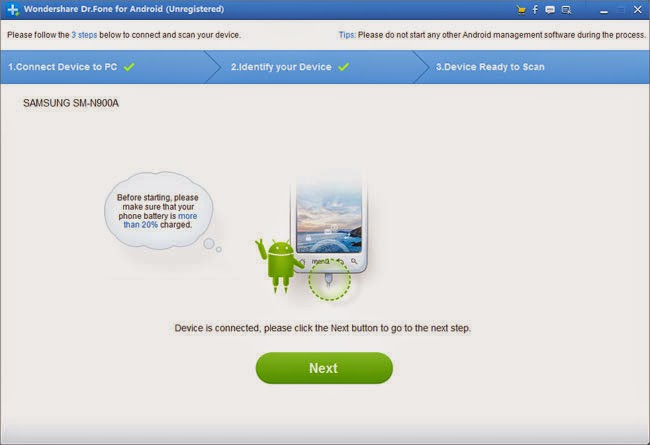
After launching Android Data Recovery, you'll get the primary window below. Please connect your Android device to the computer via a USB cable.
![]() |
| Recover Deleted Contacts from LG |
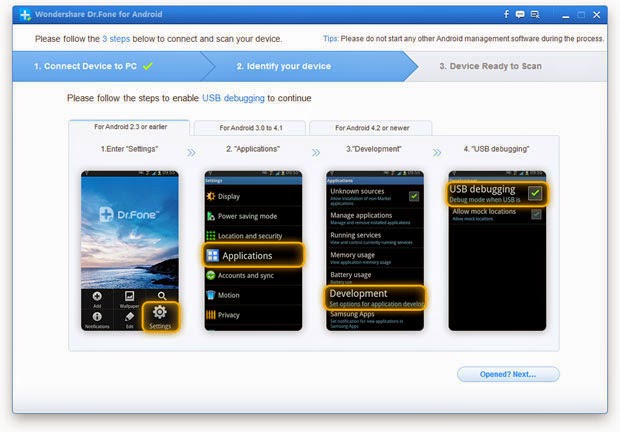
Step2. Enable USB debugging
Now you need to enable USB debugging on your device. Follow the detailed expression in the window to set it now.
1) For Android 2.3 or earlier: Enter "Settings" < Click "Applications" < Click "Development" < Check "USB debugging"
![]() |
| Recover Deleted Contacts from LG |
![]() |
| Recover Deleted Contacts from LG |
![]() |
| Recover Deleted Contacts from LG |
Step3. Begin to analyzing the data on your device
After you get the USB debugging down, the program begins to connect your device. Click "Start" to analyze the data on your device.
![]() |
| Recover Deleted Contacts from LG |
After your device is detected, you need to allow the program super user authorization on the screen of your device. Just click "Allow" when the message pops out on your device’s screen.
![]() |
| Recover Deleted Contacts from LG |
Step4. Ready to scan your device for data on it
Now your device has been successfully detected. Click "Start" to scan it. Do not disconnect your device during the scan, or the scan will fail.
![]() |
| Recover Deleted Contacts from LG |
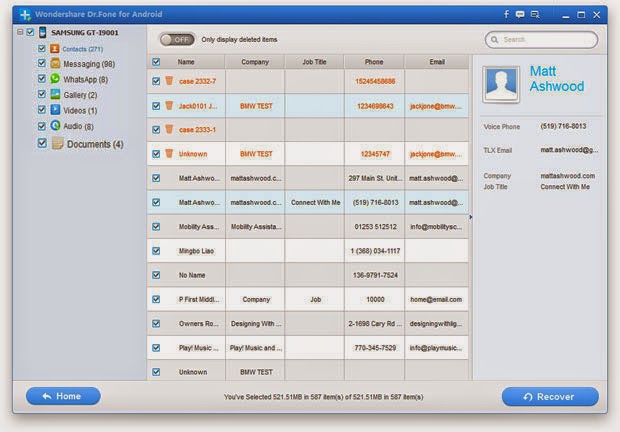
The scan will take you a while. After that, you can preview all recoverable data found in the scan result one by one. Actually, the current messages, contacts, photos and video are also scanned out in the result. Deleted SMS and contacts are shown in red. You can separate them by the color.
After preview, mark those you want and click "Recover" to save them on your computer. As to contacts, you can save them in CSV, vCard or HTML format; to messages, save them in CSV or HTML format.
![]() |
| Recover Deleted Contacts from LG |
.png&container=blogger&gadget=a&rewriteMime=image%2F*)
Friday, December 26, 2014
How to Recover Lost Data to LG Phones
To recover data on LG phone is no longer a fresh question among diverse different data lost cases on Android devices. Though fell far behind in the world Android market, but LG performs greatly in recent years and has produces quite a lot excellent LG Android phones. And quite a lot fans feel great whiling using those LG Android phones.
Then when losing data on LG phones, how can an ordinary user get a chance and restore lost data? To recover data on LG phone is no longer a troublesome case now with EaseUS MobiSaver for Android. This is a professionalAndroid data recovery software which helps to recover data on LG phone.
Android Data Recovery Software, As a useful data recovery tool, Android Photo Recovery can selectly scan your phone or tablet to extract your images and movies out and save them safely on your computer. With this app, you can easily restore your deleted or formatted pictures and videos from LG G2,LG G Flex, LG G3, LG GPad 8.3,Google nexus 4 , Google nexus5,LG Optimus Q, LG Optimus L9, LG Optimus 2X, etc.
LG Phone, Photos and videos are the best means to cherish good old days. Many LG Phone user said they have taken a lot of photos and videos in their daily life and store them on the LG devices. If you accidentally deleted some pictures, videos or other media files from LG Phone, or formatted the media storage, don’t panic, the Android Data Recovery software will help you bring the deleted files back.
Step 2 Connect your Note to the computer
Step 3 Enable USB debugging
The following interface shows you the recoverable files. Choose whatever you like. But "Contacts" is recommended if only the info of your acquaintance is wiped off.
Step 4 Analyze and scan your phone
After the a few seconds' analysis, turn to your device, you will see a popping request on the screen. You just need to click "Allow", then go back to the computer and click "Start" on the program's window to start scanning your device.
Step 5 Preview and restore deleted contacts
A powerful file recovery tool will be safer for you to retrieve your precious contacts or other data such as pictures, music, videos, SMS messages and so on. Android Data Recovery will be your best choice and reliable helper.
Then when losing data on LG phones, how can an ordinary user get a chance and restore lost data? To recover data on LG phone is no longer a troublesome case now with EaseUS MobiSaver for Android. This is a professionalAndroid data recovery software which helps to recover data on LG phone.
Android Data Recovery Software, As a useful data recovery tool, Android Photo Recovery can selectly scan your phone or tablet to extract your images and movies out and save them safely on your computer. With this app, you can easily restore your deleted or formatted pictures and videos from LG G2,LG G Flex, LG G3, LG GPad 8.3,Google nexus 4 , Google nexus5,LG Optimus Q, LG Optimus L9, LG Optimus 2X, etc.
LG Phone, Photos and videos are the best means to cherish good old days. Many LG Phone user said they have taken a lot of photos and videos in their daily life and store them on the LG devices. If you accidentally deleted some pictures, videos or other media files from LG Phone, or formatted the media storage, don’t panic, the Android Data Recovery software will help you bring the deleted files back.
First of all, download LG Phone Data Recovery from the following button.
Now free download the below trial version of the Android recovery software:
How to retrieve deleted contacts from your Android Phone
Step 1 Avoid the Deleted Phone Numbers from Being Erased Totally
When you have lost data on Samsung Galaxy Note, try not to use or update it. Apparently, this behavior will create new files which stand a chance to cover the old content. Thus, they can not be extracted again.
Step 2 Connect your Note to the computer
Launch the software on your computer after the installing. Then you'll get the window as below. Connect your device to the computer.

Step 3 Enable USB debugging
In this step, you need to enable USB debugging on your phone. You can do that in the light of the follow steps which show different accesses for different android system.
1) Android 4.2 or newer: Enter "Settings" > Click "About Phone" > Tap "Build number" for several times until getting a note "You are under developer mode" > Back to "Settings" > Click "Developer options" > Check "USB debugging"
2) Android 3.0 to 4.1: Enter "Settings" > Click "Developer options" > Check "USB debugging"
3) Android 2.3 or earlier: Enter "Settings" > Click "Applications" > Click "Development" > Check "USB debugging"

The following interface shows you the recoverable files. Choose whatever you like. But "Contacts" is recommended if only the info of your acquaintance is wiped off.

Step 4 Analyze and scan your phone
After your device is detected by the software, check your phone battery to make sure it's more than 20% charged. Then click "Start" to analyze the data on your Samsung Galaxy Note 4.

After the a few seconds' analysis, turn to your device, you will see a popping request on the screen. You just need to click "Allow", then go back to the computer and click "Start" on the program's window to start scanning your device.

Step 5 Preview and restore deleted contacts
After a few minutes' scan, all recoverable contacts found on your device will be displayed on the window, you can preview them one by one, and tick those you want and save them on your computer by clicking "Recover".

A powerful file recovery tool will be safer for you to retrieve your precious contacts or other data such as pictures, music, videos, SMS messages and so on. Android Data Recovery will be your best choice and reliable helper.
Another Way to Recover Lost Contacts from your Gmail
Go to MENU > SETTINGS > ACCOUNTS AND SYNC > GOOGLE to check if the little dot on the right is green. Green means that your Google account has been binding to your phone. That's because if you've registered your Google account on your Samsung Galaxy Note and enabled the “SYNC ALL” button on it, ‘your contacts will be automatically backed up to your Gmail. Then you can login your Gmail and bring all your contacts back from it.
Note: Back up your Samsung Galaxy Note from time to time. This will definately do you help when meeting with an emergency. One can either do a backup file with Gmail or use this tool, Android Transfer.
Subscribe to:
Posts (Atom)
-
Summary: Although you are unlikely to lose data while updating your device, it can happen. Once you upgrade your device to IOS 14, you may e...
-
When you buy a new Google pixel or pixel XL, support or custom ROM is an unavoidable topic. Support and custom ROM makes your pixel phone mo...
-
Some iPhone Users ask: I accidentally deleted all important messages of my iphone 4S, there are a lot of value messages,all of this message...